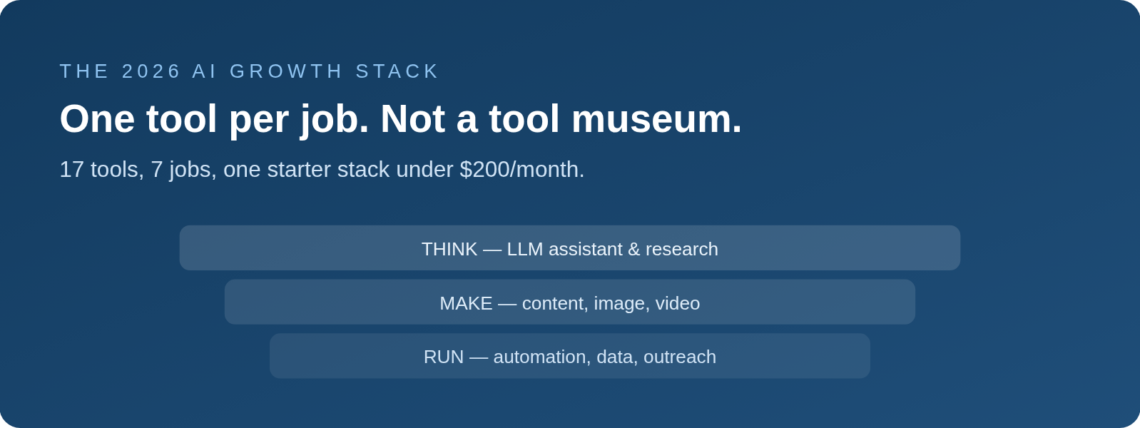
I once watched a two-person startup out-ship a funded team of twelve. Their secret wasn’t talent or hours. It was that every repetitive job in their growth process had an AI tool bolted to it. Here are the 17 tools I’d actually use in 2026 — organized by job, with pricing, and a starter stack under $200/month.
TL;DR — THE STACK IN 60 SECONDS
- Don’t collect tools. Assign them jobs. Seven jobs cover a growth team: thinking, research, writing, visuals, video, automation, and data.
- Pick ONE primary LLM (ChatGPT, Claude, or Gemini) and learn it deeply. Depth beats variety.
- The starter stack: one LLM + Perplexity + Zapier or Make + Canva + one specialist for your biggest bottleneck. Roughly $150–200/month.
- AI compresses execution, not judgment. It makes a good growth process faster. It cannot replace one.
Table of Contents
A few years into advising startups, I noticed a pattern.
The teams drowning in work all had the same setup: twenty AI subscriptions, half of them forgotten, none of them wired into an actual process.
The teams shipping fast had fewer tools, not more. But every tool had a job. The LLM drafted. The automation platform moved data. The design tool shipped creatives. Nothing overlapped, and nothing sat idle.
That’s the whole philosophy of this list. Not “here are 17 shiny things.” Rather: here are the seven jobs a growth team does every week, and the best tools for each job in 2026.
Prices below are the published rates as I write this. AI pricing changes constantly — treat them as ballpark, and check the tool’s site before you commit.
The One Rule: A Tool Is Hired for a Job
Before the list, the rule that makes it work.
Never adopt a tool because it’s impressive. Adopt it because a specific, recurring job in your growth process is slow, and this tool makes it fast.
If you can’t name the job, you don’t need the tool. That one filter will save you more money than any discount.
A growth stack is like a payroll. Every tool on it should have a job title, a weekly output, and a reason it hasn’t been fired.
Job 1 — Thinking & Drafting: Your LLM Core
Every stack starts here. One general-purpose AI assistant your whole team uses daily — for drafting, editing, brainstorming, summarizing, and increasingly for building small tools.
Pick one of these three as your default. Depth with one beats dabbling with all.
1. ChatGPT (OpenAI)
Free tier · paid plans from roughly $20/month per user (a cheaper Go tier exists in some markets)
The strongest all-rounder and the biggest ecosystem. Custom GPTs, voice, vision, data analysis, and integrations mean your team can build small internal workflows without engineering help. If you only buy one AI subscription, this is the default choice.
2. Claude (Anthropic)
Free tier · Pro at ~$20/month
The writer’s pick. Claude is consistently favored for long-form drafts, nuanced editing, and digesting big documents — paste a 100-page report or your entire positioning doc and work against it. Many growth teams run Claude for writing and ChatGPT for everything else.
I still draft every long-form growth memo in Claude first — it catches the nuance ChatGPT sometimes flattens.
3. Gemini (Google)
Free tier · paid AI plans bundled with Google One / Workspace
The obvious pick if your company lives in Google Workspace. Gemini reads your Docs, Sheets, and Gmail context, which removes the copy-paste tax the other two carry. Strong multimodal features and generous free access.
My honest advice after trying all three: stop reading comparisons. Pick one today, build a shared prompt library, and move on.
Job 2 — Research & Competitive Intel
4. Perplexity
Free tier · Pro at ~$20/month
An answer engine with citations. Use it for market sizing, competitor teardowns, and “what changed in my category this quarter” sweeps. The difference from a chatbot: every claim links to a source you can check. For a growth team, that’s the difference between research and rumor.
Perplexity quietly replaced Google as the first tab I open when I start a competitor teardown.
5. NotebookLM (Google)
Free · paid tier available
Upload your customer interviews, survey exports, and call transcripts, then interrogate them. It only answers from your sources, which makes it the safest way to mine voice-of-customer data without the AI inventing quotes. The audio-overview feature turns research into a podcast your team will actually consume.
Job 3 — Content & SEO at Scale
6. Jasper
From ~$59/month (annual)
A marketing-specific writing layer: brand voice, campaign templates, and team workflows on top of the big models. Worth it once multiple people produce content and consistency starts slipping. Solo founders can usually stay on their core LLM instead.
7. Surfer
From roughly $79–99/month
The SEO editor. It scores your draft against what currently ranks for your keyword — terms, structure, length — so your AI-assisted posts go out optimized rather than hopeful. Pairs naturally with your LLM: draft in Claude, optimize in Surfer, publish.
8. Notion AI
Notion free tier · AI included in paid plans (~$10+/user/month)
Not a headline tool — the connective tissue. If your growth wiki, experiment log, and content calendar live in Notion, its built-in AI drafts, summarizes, and answers questions across all of it. The experiment documentation habit from my growth framework post — every test logged with its hypothesis, ICE score, and lesson — gets dramatically cheaper here.
A pattern I keep seeing: the content tools only pay off for teams that already know what they want to say. Tools amplify a voice; they don’t create one.
Job 4 — Images & Design
9. Midjourney
From ~$10/month
Still the quality bar for generated imagery. Use it for ad concepts and brand visuals — the classic win is a blog hero that doesn’t look like stock photography. The learning curve is real; the ceiling is the highest.
10. Canva (with Magic Studio)
Free tier · Pro at ~$15–18/month
The pragmatic choice for everything shipped daily: social creatives, decks, one-pagers, resized ad sets. Its AI features — background removal, magic resize, text-to-image, brand kits — cover 80% of a growth team’s design needs without a designer in the loop. Typical output: one winning creative resized into every ad format in about ten minutes.
Job 5 — Video & Audio
11. Runway
Free credits · paid from ~$12–15/month
Text-to-video and AI editing for ad variations and product teasers. You won’t make your brand film here, but for producing five ad variations in under an hour to test against each other, it’s unmatched at the price.
12. Descript
Free tier · paid from ~$12–24/month
Edit video and podcasts by editing the transcript — delete the sentence, the footage cuts itself. Add studio sound, remove filler words, clip social snippets. If founder-led content is part of your growth motion, this pays for itself in the first week. I avoided video for years; this is the tool that finally made it feel like editing a doc instead of learning a craft.
13. ElevenLabs
Free tier · paid from ~$5/month
The leading AI voice tool. Narrate product demos, localize videos into other languages, or clone a (consenting) founder voice for scaled audio content. Quality has reached the point where listeners genuinely can’t tell.
Job 6 — No-Code Automation: The Glue
This is the layer most teams skip, and it’s the one that separates “we use AI” from “AI runs parts of our growth engine.” Pick one.
It’s also the layer that turned our weekly experiment log from a chore into something the whole team actually updates — results flow in automatically, so nobody has to remember.
14. Zapier
Free tier · paid from ~$20–30/month
The easiest on-ramp, with the biggest app library and built-in AI steps. Lead comes in → AI scores and enriches it → routed to the right sequence → logged to your CRM. No engineers involved.
15. Make or n8n
Make from ~$9–10/month · n8n free self-hosted, cloud from ~$20–24/month
The power-user alternatives. Make is cheaper per operation for complex multi-branch workflows; n8n is open-source, self-hostable, and the strongest choice for AI-agent-style automations where you want full control and low marginal cost. If Zapier starts feeling expensive or limiting, you graduate here.
Job 7 — Data, Meetings & Outreach
16. Fireflies (or Fathom)
Free tiers · paid from ~$10–18/month
AI meeting notes across your sales calls, user interviews, and team syncs — transcribed, summarized, searchable. For growth work specifically: it turns every customer call into minable research data instead of a memory.
17. Clay
From ~$134–149/month
The most expensive tool on this list and, for outbound-driven startups, the most powerful. Clay enriches prospect lists from dozens of data sources and uses AI to research and personalize outreach at scale. If outbound isn’t your channel, skip it without guilt. If it is, this replaces a junior SDR’s entire research function.
Notice what’s not on this list: no AI tool for strategy. That job stays human. Everything above exists to clear the calendar so you can do it.
The Starter Stack: Under $200/Month
Seventeen tools is a menu, not a shopping list. Here’s what I’d actually deploy for a lean team starting today:
| Job | Pick | Approx. cost | Why this pick |
|---|---|---|---|
| Thinking & drafting | ChatGPT or Claude (pick one) | ~$20/mo | One deep LLM beats three shallow ones |
| Research | Perplexity Pro | ~$20/mo | Cited answers — research, not rumor |
| Customer-data mining | NotebookLM | Free | Answers only from your own sources |
| Design & creatives | Canva Pro | ~$15/mo | Covers 80% of daily design, no designer needed |
| Automation glue | Zapier or Make | ~$20–30/mo | Turns tools into a system that runs itself |
| Meetings → research | Fireflies free tier | Free | Every call becomes searchable customer data |
| One specialist for your bottleneck | Surfer (SEO) / Descript (video) / Clay (outbound) | ~$12–99/mo | Spend where your funnel actually leaks |
Total: roughly $90–200 per month depending on the specialist. That stack, used daily and wired together with automation, outperforms a $2,000/month pile of idle subscriptions every time.
One more thing: these paid tools sit on top of free agent skills I open-sourced for founders who think in bets — grab them at Growth Skills.
How This Stack Raises Experiment Velocity
Here’s the mental model I use for growth output: experiments per week × win rate × impact per win. You can’t control the last two. You can control the first.
That’s the real job of this stack. Every tool above removes a bottleneck that used to cap how many tests a small team could ship: drafts that took a day take an hour, five ad variations replace one, research that took a week takes an afternoon, and the automation layer logs it all without anyone remembering to.
But velocity without direction is just expensive motion. Point this stack at one North Star metric, run the ideas through an ICE-scored backlog, and review it in a weekly loop. I wrote up that exact system in The Growth Hacking Framework I’ve Used for 18 Years — the two posts are designed to work together.
Three Mistakes That Waste Your AI Budget
- Collecting instead of deploying. A subscription you haven’t wired into a weekly workflow is a donation to a software company. Audit monthly; fire anything without an output.
- Spreading across three LLMs “to compare.” Your team never gets past beginner prompts in any of them. Pick one, build a shared prompt library, and switch only if you hit a real wall.
- Automating a broken process. AI makes processes faster, including bad ones. Fix the funnel step manually first. Automate it once it works.
The startups winning with AI in 2026 aren’t the ones with the most tools. They’re the ones where a small team, a clear process, and six well-chosen tools quietly ship more experiments every week than their bigger competitors ship in a month.
Hire your stack like you’d hire a team. One job each. Clear output. No passengers.
And if you want help wiring a stack like this into a real North Star + ICE system — instead of just collecting tools — I do that work with a handful of startups each quarter. Details at ranjeetvimal.com.
Frequently Asked Questions
What are the best generative AI tools for startups in 2026?
Think one tool per job, not a big collection: a primary LLM (ChatGPT, Claude, or Gemini), a research engine (Perplexity), a design tool (Canva or Midjourney), a video tool (Runway or Descript), an automation platform (Zapier, Make, or n8n), and an AI meeting/data layer. Most startups need 6–8 tools, not 17.
How much should a startup spend on AI tools per month?
A lean growth team can run a capable stack for roughly $90–200/month: one LLM (~$20), Perplexity (~$20), Canva (~$15), an automation platform (~$20–30), free tiers for meetings and customer-data mining, and one paid specialist aimed at your biggest bottleneck.
Should we use ChatGPT, Claude, or Gemini?
Pick one and go deep. ChatGPT is the strongest all-rounder with the biggest ecosystem. Claude leads for long-form writing and large-document work. Gemini wins if you live in Google Workspace. Team fluency with one tool beats shallow access to all three.
Do AI tools replace a growth team?
No. They compress execution — drafting, designing, analyzing, automating — but they don’t pick the right target, design experiments, or judge quality. The advantage goes to small teams who use AI to run more experiments per week, inside a real growth process.
What’s the cheapest effective AI stack for a solo founder?
Around $40/month: one LLM subscription (~$20), Zapier or Make’s entry tier (~$10–20), plus the free tiers of NotebookLM, Canva, Perplexity, and Fireflies. Upgrade a free tier only when you hit its ceiling in real work — not before.
How do I connect these tools so they actually talk to each other?
Through the automation layer. Zapier, Make, or n8n sit in the middle and pass data between everything else: a lead form fires → your LLM enriches and scores it → the result lands in your CRM and experiment log. Start with one workflow that saves you an hour a week, get it reliable, then add the next. Don’t build ten automations in a weekend.
Which AI tools should a growth team avoid in 2026?
Three categories: thin wrappers that just resell an LLM you already pay for; all-in-one platforms that promise every job and do none well; and bulk AI-content tools that publish hundreds of unedited posts, which risks your domain’s reputation with both Google and readers. If a tool’s pitch is “replace your whole team,” close the tab.